Friday, February 6, 2015

Google Groups for Business UI and performance improvements

Posted: 06 Feb 2015 02:02 PM PST
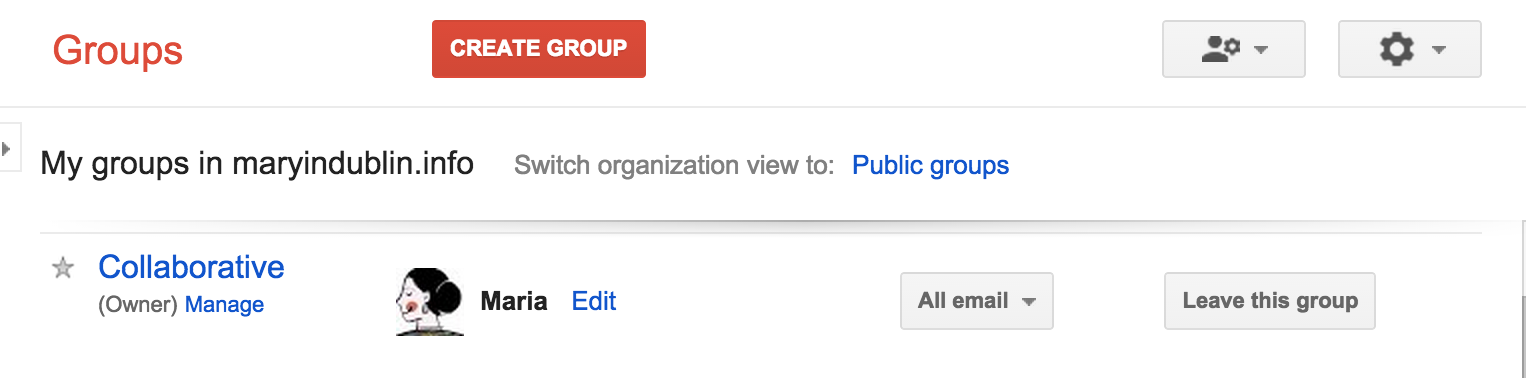
We’ll be releasing some minor UI changes to Google Groups for Business over the coming weeks, including a cleaner ‘My Groups’ page and new notification bars and dialog windows.
my_groups.png
There will be no functionality changes, just improvements to look and feel. We’re also implementing various performance improvements to reduce latency when using Google Groups.

Release track:
Rapid release and Scheduled release

Friday, January 30, 2015

This Week at Village 1.30.15

It was another great week at Village; I am a lucky teacher to be learning alongside such wonderful and committed educators!

This week…
  • the computer lab was abuzz with Google Slide creations. Your students are learning the ins and outs of creating a presentation as well as the tools they will be using for their assessments in March and May!
  • 4th Grade Special Education teachers attended a half day workshop to learn how to incorporate Google Apps for Education into their lessons. It was a great session for everyone involved! If you feel that you could lend a hand to these teachers, who are “newer” to the Chromebook experiences and the integration of technology in the classroom, please reach out to your colleagues. We all have so much to teach each other!
  • I spent two periods with a wonderful 4th grade class as we logged into and learned the basics of Glogster! I was excited to hear that they are working on their optional assignment-an All About Me. This will allow the students the opportunity to learn about the program they are using without worrying about the content. I look forward to working with them again on Monday!
  • I explored plickers with a small group of students in 5th grade. This “exit slip” assessment tool is easy to use and I would love to explore the possibilities with a few more classes. For more information, watch this video and email me for plicker cards! If you want to see plickers in action, it may be coming to your Spanish class soon!
  • I am looking for a 4th grade teacher interested in doing a Mystery Hangout with students in Minnesota. Not sure what I’m talking about? Annie Rosenberg and I will be having a morning share in February. Please let Annie and me know if you would be interested.
Be On the Look Out (BOLO) for…
  • Google classroom training, which will begin in February. I will be working with one 5th grade teacher and two 4th grade classrooms. If you are interested in learning more about Google Classroom, email me and I will be sure to add you to the list.
  • a new Hapara platform, it will be launching in March for 5th grade teachers. I will be meeting with you during flex to review the changes. 
  • Kaizena. I am looking for teachers (4th or 5th) who may be interested in exploring Kaizena. Kaizena is a Google app/add on that allows you to give different types of feedback on a Google Doc (voice recordings, typed comments and links to more information). If you would like to explore Kaizena with me, let me know.

As always, let me know if you would like to be included in any of these endeavors or if you have any projects you would like me to help you with. 

A Day in the Life of 6th Grade Science (Week of 1/26/15)


Here’s a little look at some of the awesome things going on in the 6th grade science classes at GMS.  

Team 6T


properties of matter.JPGStudents on 6T are studying the characteristic properties of matter.  In partnerships and small groups, students travel throughout the classroom to a variety of inquiry stations.


At each station, students discuss and answer questions in order to develop theories about what they see.  As they explore the properties of matter, they apply their own understanding of volume and density to each investigation  


As true scientists do, these 6th graders also share their results and compare them with the work of others.  After each of the inquiries are completed, the partnerships and small groups enter their results in a collaborative Google Doc.  Through this shared resource, students benefit from seeing not only their own results, but the results of others as well.  This collaborative learning experience helps the students identify trends and also determine the validity of their own findings.


Team 6G and Team 6S


Students on 6G and 6S are currently learning about the plant life cycle.  


wisconsin fast plants.JPGStarting with seeds, students are working in groups and growing Wisconsin Fast Plants.  Each day of the cycle is observed and data is recorded by the group. To record the data, students are using a combination of digital resources.  


Students work together using the camera feature in the Chromebooks to take photographs of the plants and work in collaborative documents to record other data.  For example, within their Google accounts, students create and share data tables in Google Docs and slideshow presentations to showcase the plants' growth in Google Presentations.


Students on 6G are also dissecting plants.  They are taking the plants apart to get closer looks at the individual parts of a flower.  Tactile,  hands-on manipulation of the plant parts coupled with the digital note-taking in Google Drive on the Chromebooks allow for students to employ a variety of learning styles during this lesson and really understand the intricacies of the plants they are studying.


IMG_3943.JPGAdditionally, through Google Drive the teachers share copies of notes pertaining to the parts and functions of the plant parts.  

Students can access these shared resources in Drive to later compare them with their own notes, and to use as study aides as they progress through the unit.  


Team 6M


Using the workshop model of instruction, students on 6M are studying pure and composite substances.  


After a whole group mini lesson, students have the opportunity to take a closer look at actual examples of various substances that are on display in the classroom.


Through Google Drive, the teacher has shared resources for students to access, while they work independently, on explaining the process through with a pure substance is converted or manufactured into a composite substance.  As the students work, the teacher holds brief individual conferences with each student to keep track of their progress with their respective inquiries and provide them with guidance as needed.


Reflection and self-assessment through the 3-2-1 exit ticket also help students take ownership of their learning and provides valuable formative assessment that shapes the teacher's future plans.  

Tuesday, January 27, 2015

Entering the Blogosphere

Many of us have entered the world of blogging this year with our classrooms using Google Blogger. Classroom blogs are easy to set up and can be used as a collaboration tool, a place for student reflection, an opportunity for digital citizenship and global awareness, or a place to enhance the learning and communication in your classroom.  Classroom blogs can be updated daily, weekly, or monthly depending on preference.  They can be used as a home-school connection or can be used solely for enrichment and reflection.  It is your choice!


Here is an example (All student comments have been removed):

A classroom blog will bring new motivation and excitement to your classroom.  Contact your school tech resource person to get started!


Blogging doesn't have to be limited to the classroom.  There are also many fabulous blogs out there that can used as a teacher resource.  Most of them can be followed on Twitter also so you can see any updates on your Twitter feed.
Here are a few favorites:

Free Technology for Teachers (Twitter handle is @rmbyrne)
The Daring Librarian (Twitter handle is @gwynethjones)
Read,Write, Reflect (Twitter handle is @katsok)
Two Writing Teachers (Twitter handle is @2writingteachrs)
TeachThought (Twitter handle is @teachthought)
Edutopia (Twitter handle is @edutopia)


Monday, January 26, 2015

This Week at Village 1.23.15

Hi Village Friends,

This week at Village was a productive one and there is much to be celebrated! 

Here are some of the technology integration highlights:
  • Teachers continue to join the Twitterverse. It’s not too late to to join in the learning. Check out the Tweet 10 Challenge. If you have completed the challenge, remember to send me a direct message via Twitter to claim your badge and your sticker once you’ve completed Day 5! Still not convinced that Twitter is worth it? Check out the #wwprsd hashtag and see what your colleagues have tweeted!
  • A 5th grade classroom traveled to Virginia via Google Hangouts. It was a wonderful Mystery Hangout; the students were able to guess the mystery location in 7 guesses! What a great way to build geography skills and expand your world.

Ms. Rosenberg gets her greeters set
up for their Mystery Hangout. 
Students use their Chromebooks and laminated
maps of the US to eliminate incorrect locations.
This student is recording the questions her
classmates have asked. This list was referred
to often during the Hangout


These groups of students did research to help
determine where the other class might be located
and to help ask questions.

  • The tech team met to start planning the February PD Day. Special Area Teachers, if you have an idea for content that we can facilitate and help you plan, let me know!
  • The tech team also met to develop training for the Special Ed Teachers and their new Chromebooks.
  • I met with a 4th grade teacher to discuss an upcoming Glogster activity. 
Here’s a brief look at next week:
  • Virtual Debates are coming. I’m working with a 5th grade teacher to plan a Google Hangout debate using the new Social Studies curriculum. We will be debating population growth with 5th graders from Millstone.
  • Symbaloo webmixes
  • Twitter, Twitter, and more Twitter! Let me know if you still want to take part in the challenge. 
  • YOUR project?!?!?

Please let me know if you would like to be included in any of these endeavors or if you have any projects you would like me to help you with. 

Thursday, January 22, 2015

New versions of the Google Docs, Sheets, and Slides apps on Android and IOS

Posted: 21 Jan 2015 02:05 PM PST
New versions of the Google Docs, Sheets and Slides apps are now available on Google Play and the App Store. New features include real-time spell-checking in documents (new for iOS only), inserting links (Android only) and hiding rows/columns in spreadsheets, and grouping shapes in presentations. We’ve also added support for Touch ID on iOS, so you can unlock Docs, Sheets and Slides with your unique fingerprint.

Release track:
Rapid release and Scheduled release

Wednesday, January 21, 2015

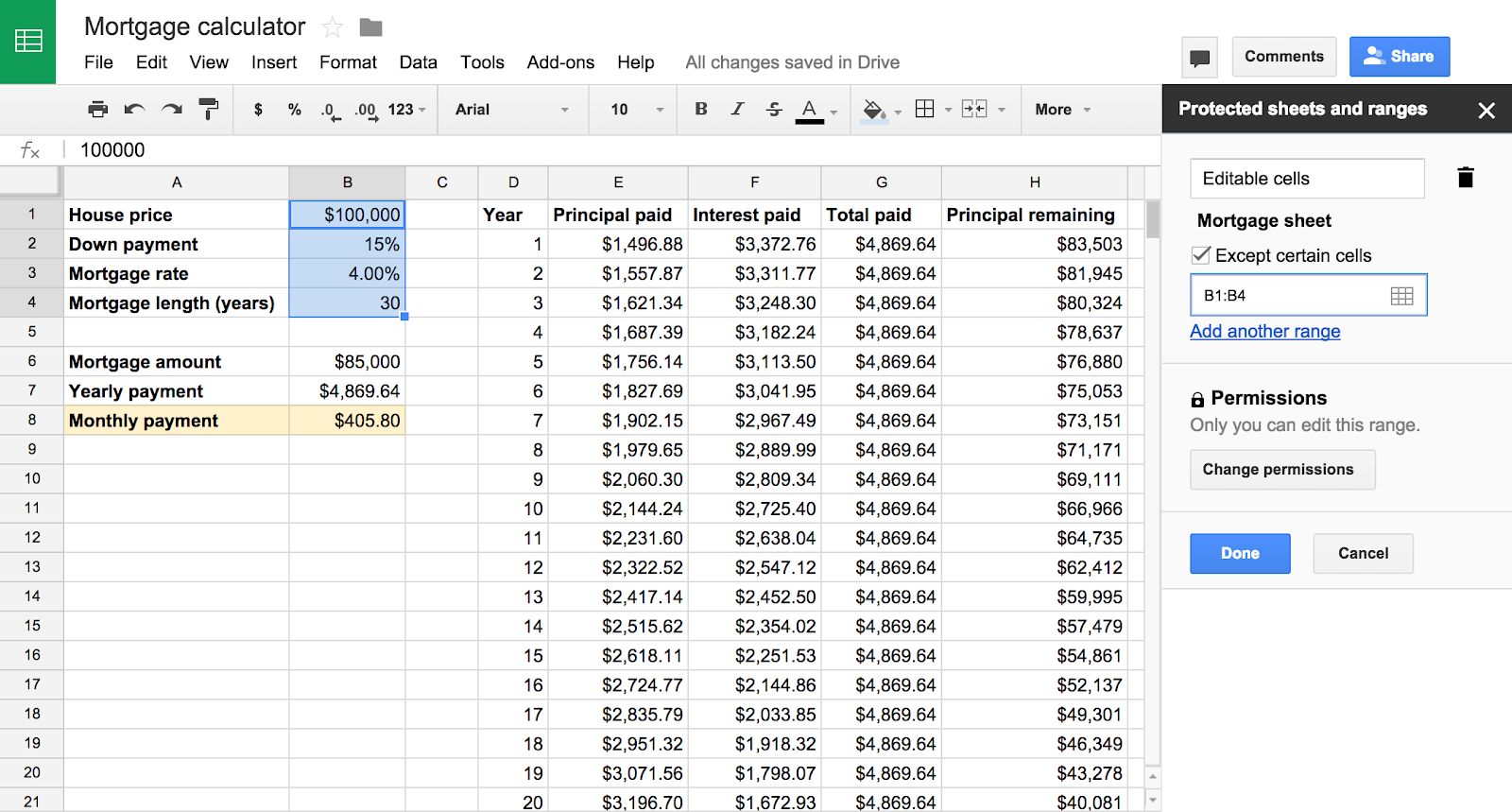
Protected sheets and ranges improvements in Google Sheets

Posted: 21 Jan 2015 02:50 PM PST
We’re launching several improvements to the protected sheets and ranges functionality in Google Sheets, providing faster and more granular control when locking down sections of content in spreadsheets.

Key changes include:
§ Ability to lock down all content in a sheet except a particular cell or range
§ Faster set up with the ability to re-use the same permissions you previously chose on a different set of cells
§ Ability to quickly lock down a sheet or range to only a single person, a small number of people or a domain
protected-1.png
Release track:
Rapid release, with Scheduled release coming in two weeks