Showing posts with label iPad App. Show all posts

Friday, April 3, 2015

Podcast PD-A Series Exploring the Infinite Resources Available Over the Air Waves


As teachers we often find ourselves stuck in the rut of attending traditional Professional Development (faculty meetings, in district PD, out of district workshops, morning shares and lunch & learns). In the ever evolving educational world in which we live there are myriad ways to expand your learning: from Edcamps and unconferences, to weekend workshops and week long seminars, to books, blogs and webinars. One of my favorite ways to develop professionally is to listen to an educational podcast.
Apple's Podcast App 

A quick search in iTunes, Stitcher or Google will show you that educators are taking to the mic and broadcasting their expertise beyond the classroom. Educational podcasts are the NEW PD. New content is generally created on a weekly or biweekly basis and topics range from information as specific as educational technology to broader topics like educational truths.
It is my intention to explore one new podcast and offer tips and tricks for how you can make podcast listening a worthwhile source of professional PD.

The House of #EdTech with Chris Nesi
This week I bring you The House of #EdTech with Christopher Nesi (@mrnesi)

The House of #EdTech was my first experience with educational podcasts and is still one of my favorites! Chris releases new content every other week and the information he shares “explores how technology is changing the way teachers teach and the impact that technology is having in education.” His episodes include an interview with a leader, teacher or creator in educational technology (I am always left wanting more), an ed tech thought, an ed tech recommendation (an app or other edtech tool), and the House of #EdTech VIP (I have expanded my Twitter PLN with Chris’ list of VIPs!). Episodes range from 18 - 64 minutes. For more information about The House of #EdTech, visit http://www.chrisnesi.com

Tips and Tricks for Getting Started (using Apple's Podcast App)
  1. Download and/or open your podcast app (as an Apple Girl, I use Podcast).
  2. Search for the specific podcast you you want to download (this week I recommend the House or #EdTech), or search using key words (educational technology, reading, math, grammar, etc.)
  3. Click on the cloud next to the episode you want to download or click on the podcast "Cover Art" for a list of podcast episodes and click on the cloud of episodes you wish to explore.
  4. Go back to My Podcasts, select the podcast you just downloaded and then select the specific episode.

Happy Listening!
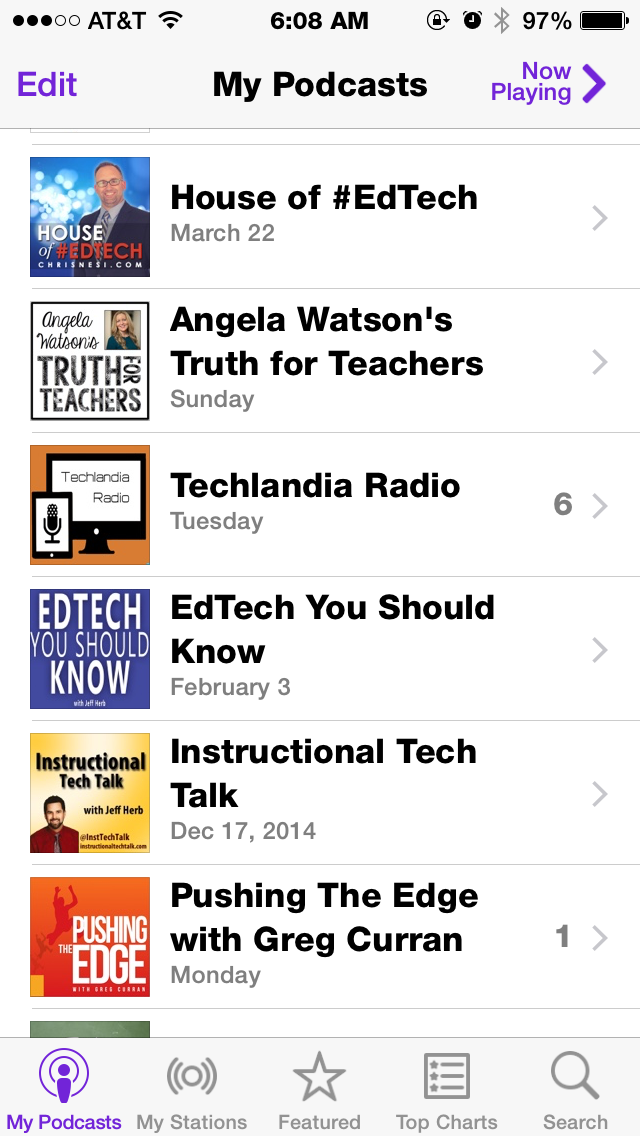
IMG_6336.PNG
I'm an Apple Girl-
all podcast links direct to iTunes
I hope you join me each week as as I explore one podcast from my list and offer advice for how you can leverage podcasts to enhance your own professional and personal learning. This is an abbreviated list of what’s currently on my podcast app and what's to come in future posts. 
What podcasts are you listening to? Do you have any favorites? Tell me in the comments below.

Friday, February 6, 2015

Seesaw Your Way to a Free Friday 'App'etizer


Digital portfolios of student work can be hard to setup and maintain, but Seesaw: The Learning Journal aims at making this process quick and easy with an added benefit --- sharing the student's work simply with parents.  The video to the left shows how simple it could be implemented in a classroom where the students add their work to their journal through use of the iPad's app.  Once work is approved by the teacher, the parents (if setup) would be notified and then could see what their child completed at school.  Seesaw came on my radar after I read about it through these blog posts:
   - Students Can Build Digital Portfolios with Seesaw for iPad
   - Capture Student Work with Seesaw - The Learning Journal
   - Seesaw Journal: A Tool for English Language Learners

This is a must checkout app!  If you would like any assistance with setting this up or discuss how to implement this in your classroom please let me know.  What's also nice is, two days after I setup a test account I received an email from the app's company 'checking in' with links to resources:
Thanks again for signing up for Seesaw.  We know it can be hard to get started with a new app, so we’ve compiled a few tips from other Seesaw teachers to get you going. 
1.     Get Your Class Ready: Add your students and choose whether or not you want to customize profile photos or use the built-in icons.  Click here for help managing your class list.
2.     Print Your Class Handout: Your classroom QR code is the “key” your students will use to access your Seesaw class. Print out this handout and post it in your classroom where students will use Seesaw.  We emailed you this handout when you signed up or you can get it on the Seesaw website.
3.     Test Seesaw on Your Network: If your school has any network filters in place, have your tech team whitelist *.seesaw.me so that Seesaw is fully functional. If you can sign-in as a teacher or student and add an item, you are good to go! 

Have questions? We're here to help! We're available by email or Google Hangouts to answer questions and help you get started.

—The Seesaw Team

PS: Check out the Seesaw Help Center for more getting started tips, teacher resources & activity ideas.

Friday, January 9, 2015

First Friday 'App'etizer for 2015!

Welcome to the new year!  The app I have to recommend is one which allows you to take any photo from your camera roll or picture you want to take with the camera and convert it to appear as a painting.  Brushstroke is quick and simple.  They have several different artistic styles to choose from and allows you to even sign your 'work'.  Take a look at the before and after:


This would be a nice touch for student presentations!

Friday, December 19, 2014

Getting Creative with a Friday App (which is FREE!)

Paper Camera is a creative way to take pictures or video and make it look like it is a comic.  They have an assortment of filters which are applied in real-time, no waiting or delays.  This could be a nice way to have students get creative with taking a picture or filming a video.  Here is the promotional video from their website.


Here is a before and after shot of my bulletin board:

Pictures and videos are saved to the camera roll for easy accessing.


Friday, December 12, 2014

Another Fun Free Friday 'App'etizer

In the past I have shared two great (at the time) apps: ChatterPix Kids and YAKiT Kids.  Both had you take a picture of anything, draw on a mouth, and have 30 seconds of record time.  Today, I have discovered an even better app for digitizing talking photos, iFunFace.

iFunFace will turn any photo into a talking bobblehead.  I haven't found a time limit for recording!  The app allows you to have more than one talking head in the picture.  You can also add accessories or change the style of your voice.  In the end go ahead and save to the camera roll.

Here is an example of an actual bobblehead becoming a digital bobblehead:

There is no end to how students could create with this app.  Math- multiple step problems: line up a set of objects, each object tells a step in the process.  Language Arts- retell a story: take a picture of the cover of their book, have the main character retell the story.  Science- solids vs. liquids: have two states of matter side by side debating which is better ("I don't need to take the shape of a container" "Well I can't be snapped in two")  Social Studies- learn about the community: get a photo of someone from the community (i.e. police, firefighter, etc.) describe their role.  Learn about a musical instrument, describe an art project, do a pitch for a new book...

The app does offer some in-app upgrades which you can dismiss and has an ad bar across the top.  Now go create your own, I know your students will get a kick out of it!

Friday, December 5, 2014

Free Friday 'App'etizer

Last year, one of our Free Friday Apps was Math Duel.  An app that allowed two players to go head-to-head in a tiered competition based on ability.  Now they have released Geography Duel.
This app allows an individual or pair on one iPad to review states, capitals, or countries.  From within settings you can change the way your map looks (Google Earth view, political map, colored areas, or a 2-tone effect).  This app was released recently and is listed as $2.99 but was downloaded to the district's wwp2 account and is available for download.

A Third Grade Heritage Project

Since mid October, I have been working with some third grade classes on their Heritage Project.  As part of their Social Studies curriculum, the students are going to interview their families using various questionnaires to gain a better understanding on the history of their name, where their families emigrated from, and their customs and traditions.  Linked below are the questionnaires:

What's in a Name?
https://docs.google.com/document/d/1PFaAivp8R59hNTNDkJKbyG7-C6ChYt2rrhuZ4s15dqI/pub

Family Customs & Traditions
https://docs.google.com/document/d/1H-PdgqnoEodF6JHc-WjQX-fyjG3jXpWg_56keBf54kM/pub

Immigration Questionnaire
https://docs.google.com/document/d/126W66QI5iInYxVN7kxWTgjs8wlqUwVTKbT1oP56Btx4/pub

We used the information gathered and various iPad apps to create a showcase of their heritage.  For their name history and their families customs & traditions we used Voice Recorder Pro 7.  We created a video using Tellagami and Green Screen to tell how their family immigrated to the United States if they answered Part A of the Questionnaire.  If they answered Part B, they created a Pic Collage then did a screencast describing their answers using ScreenChomp.  We also used Maps and Safari to get images of their native country and flag then used LayerPic HD to superimpose the images.  In some classes, students designed a logo to represent themselves using Logo Maker. Then they recorded a screencast describing their logo using ScreenChomp.  Once all the pieces were created and saved to a class Dropbox account where each student had their own folder; we were able to put the puzzle together.  Students were sent home with a permission form for the teachers to create a ThingLink account.  Here are some examples from students:

Student 1:

Student 2:

Student 3:

Student 4:

Friday, November 21, 2014

Sizing Up a Free Friday 'App'etizer

This week, I have two versions of an app for you.  Curious Ruler allows you to select a reference object from their selected list to use to measure another random object with the iPad's camera.  After you take a picture of the two items together, you mark off the sizing so the app can get you a measurement as well as an equivalent measurement.  Below are some screen shots of my measuring.


Curious Ruler is typically $0.99, but in the wwp2 account it is previously downloaded.  If you want to get it for another iTunes account there is a free version, Ruler | A Curious Tool 

Friday, November 14, 2014

Inspiration From a Fellow Colleague Leads to this Week's Free Friday 'App'etizer

    Laura Agnella submitted a post about Graphic Organizers on Thursday which had me thinking about how I like to create these on an iPad.  As mentioned in Laura's post, Popplet Lite works very nicely and I sent out as an 'app'etizer last year, Tools 4 Students.  But my current free favorite graphic organizer/brainstorming/mind mapping app is: iBrainstorm.  Why, you may ask, is this my current favorite?  Well, in terms of features, it's simplistic.  Add a sticky note with a limited number of color choices and type out some text.  Draw with limited color choices and line thicknesses or use the eraser.  That's it!  No shapes or bubbles or images to add; don't get overwhelmed with options or choices.  When finished, save it to your photo library; from there, it could be uploaded to Dropbox or Google Drive.  You could also email it if you wanted.  Now, let the students plan & create!

Here is one I started so you can see what it looks like:

Friday, October 31, 2014

Spooktacular Free Friday 'App'etizer

This week I come to you with an app, Comic Touch 2 which can be used to introduce a couple of topics.  Two which this app screams to use are dialogue and onomatopoeia.  Comics can be a great way to showcase to students how these literary devices appear as text, as in the example below.


This app could be used to make a cover for a writing piece or even just a cover for any project.

Hmmmm, I see a comic book cover for...

Math: 'The Adventures of Super Triangle and the League of Tangrams'

or

Science: 'The Exciting, Spectacular, Amazing Properties of Water'

or

Social Studies: 'Around the Community in 30 Days'

or

Art: 'Meet the Artist volume 7 issue 2'

or

The ideas are endless... or are they... To Be Continued...

Friday, October 24, 2014

Free Friday 'App'etizer for October 24, 2014

This week's 'app'etizer is actually a 'smash' of two apps:
Pumpkin Carver Plus
YAKiT Kids

In preparation for next Friday, you can have your students 'carve' a pumpkin on the iPad, then save it to the camera roll.  From within the app, YAKiT Kids, they can place a mouth on their jack o'lantern and record themselves (30 seconds of recording time).  Afterwards they can adjust the pitch of their voice, higher or lower, and save it to the camera roll.  I recorded the one below.


How could you utilize this in your classroom???

Friday, October 17, 2014

Free Friday 'App'etizer for October 17, 2014

This week's 'app'etizer is Pattern Shapes, by the Math Learning Center.

I like this app because in a sense it is two apps in one.  First, students can manipulate the various geometric shapes on the screen, simply be dragging and dropping (a skill needed for PARCC).  While interacting with the shapes, they can see a relationship between them;

one hexagon is composed of a triangle, a parallelogram, and a trapezoid (CCSS.MATH.CONTENT.3.G.A.2)   The second aspect of this app which I like is how it offers tangrams for the students to complete.

Challenge your students with Symmetry!  "Can you make a reflection of this shape?"

I hope you enjoy this app and add it to your collection of Math Tool Apps.