Showing posts with label google slides. Show all posts
Showing posts with label google slides. Show all posts
Friday, September 30, 2016

Thursday, March 24, 2016
Change your filters, themes, and layouts in the Google Sheets and Slides apps for iOS
Posted: 24 Mar 2016 04:55 AM
PDT
New versions of the
Google Sheets and Slides apps for iOS are available in the App Store. With
these updates, you can now:
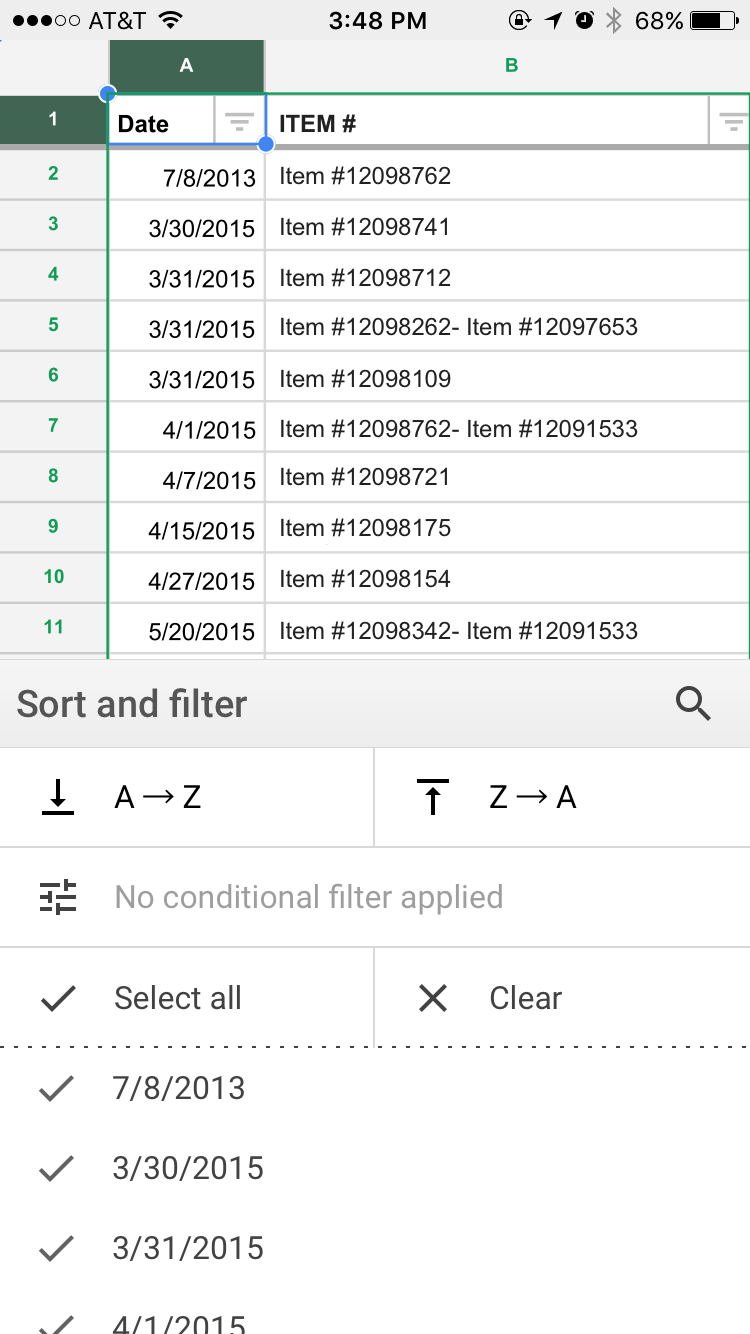
§ View and modify existing
filters in the Google Sheets iOS app.
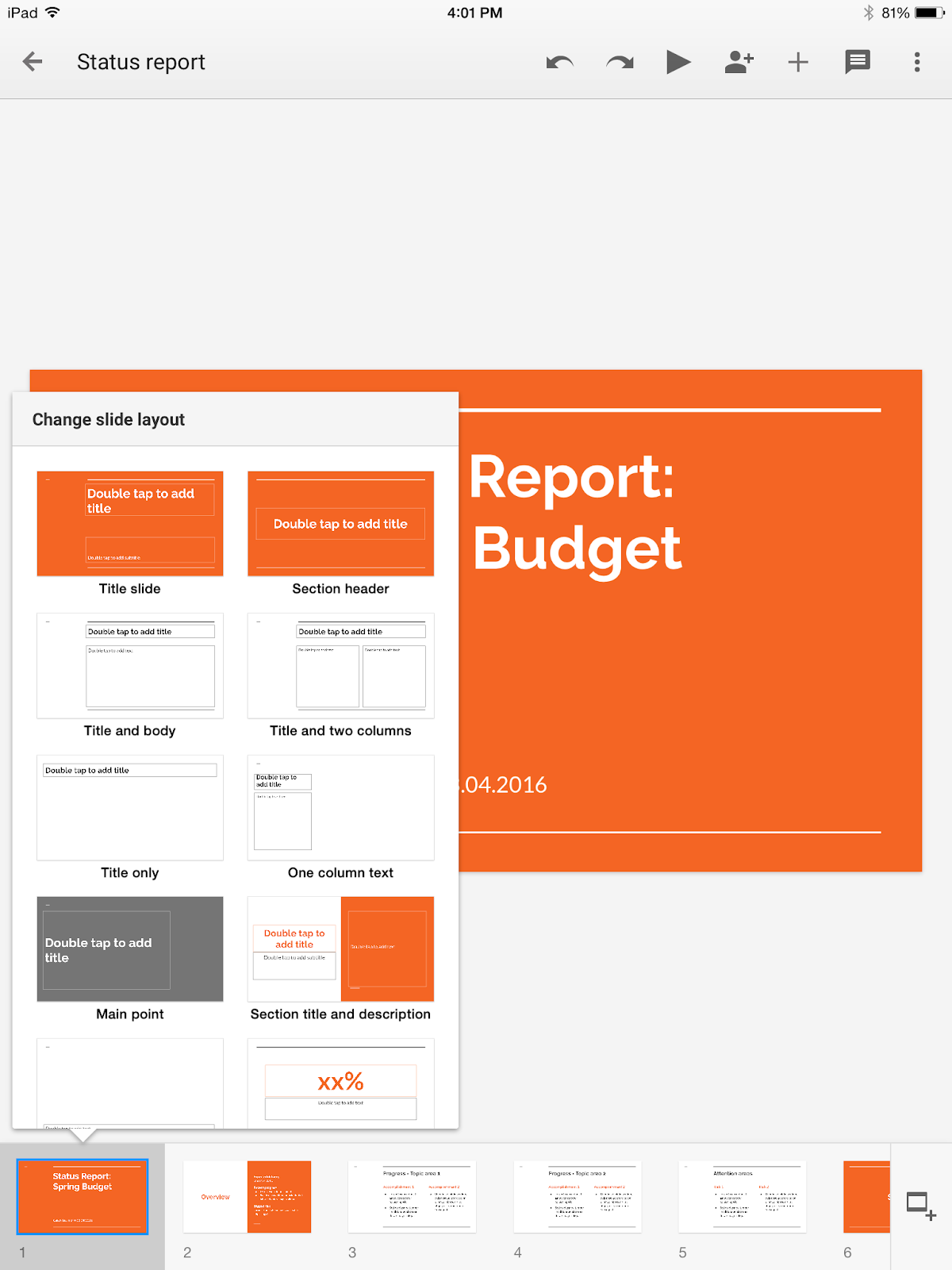
§ Change the theme or
layout of a presentation in the Google Slides iOS app.
Check out the Help Center articles below for more information.
Release track:
Launching to both Rapid release and Scheduled release
Rollout pace:
Gradual rollout (potentially longer than 3 days for feature visibility)
Wednesday, March 23, 2016
Support for more file formats in the Google Sheets and Slides Android apps
Posted: 23 Mar 2016 12:50 PM
PDT
Updated versions of the
Google Sheets and Slides apps for Android are now available on Google Play.
Check out what’s new below:
In the Sheets Android app, you can now:
In the Sheets Android app, you can now:
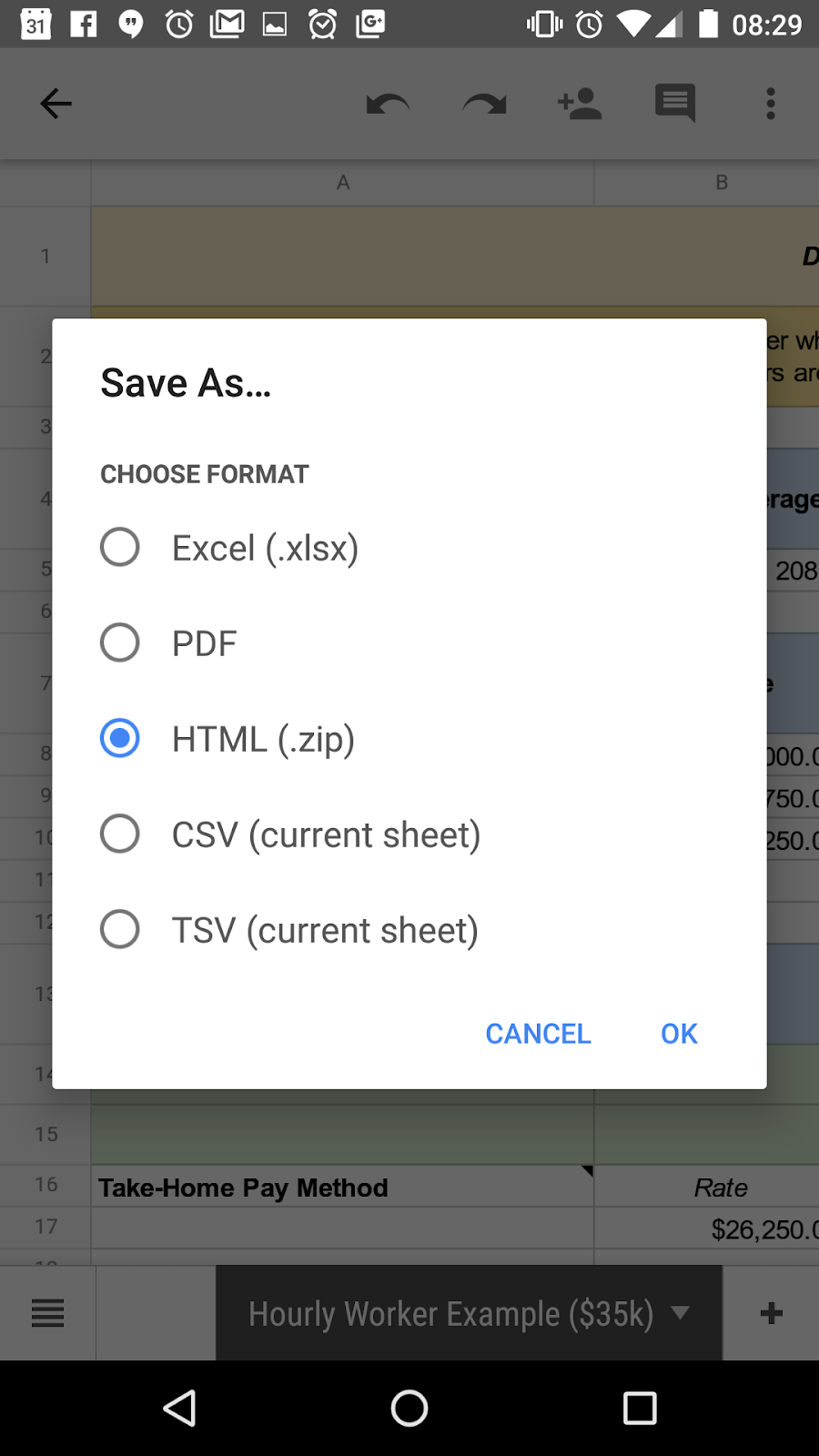
§ Send a copy of or save a
spreadsheet as an HTML web page file (provided in a .ZIP folder) from the Share
& export menu.
§ Save the sheet you’re
currently viewing as a .CSV or .TSV file from the Share & export
menu.
§ View Google Drawings
in spreadsheets (note that Drawings will not be visible in frozen rows and
columns).

In the Slides Android
app, you can now:
§ Send a copy of or
download the slide you’re currently viewing as a .JPEG, .PNG, or .SVG file from
the Share & export menu.


Release track:
Launching to both Rapid release and Scheduled release
Rollout pace:
Gradual rollout (potentially longer than 3 days for feature visibility)
Tuesday, March 15, 2016
Set expiration dates for access to Google Drive, Docs, Sheets, and Slides files
Posted: 15 Mar 2016 12:05 PM
PDT
We know that businesses today don’t operate in isolation;
employees work not only with one another, but with third-party vendors,
clients, customers, and other businesses as well—and often on a temporary
basis. To keep your organization’s information safe in these situations, we’re
introducing the ability to set an “expiration date” for specific user access to
files in Google Drive, Docs, Sheets, and Slides.
For instance, imagine your business hires an outside contractor for a project lasting three months. To complete the job, that contractor needs to view a spreadsheet containing the contact information of your employees. Following this launch, you’ll be able to share your employee list in Sheets with the contractor, give them view access only, and set that access to expire when their contract does (in three months). If the contractor attempts to open the spreadsheet after the expiration date has passed, they’ll be denied access.
For instance, imagine your business hires an outside contractor for a project lasting three months. To complete the job, that contractor needs to view a spreadsheet containing the contact information of your employees. Following this launch, you’ll be able to share your employee list in Sheets with the contractor, give them view access only, and set that access to expire when their contract does (in three months). If the contractor attempts to open the spreadsheet after the expiration date has passed, they’ll be denied access.

This functionality, coupled with the Information Rights Management (IRM) features we launched last July, should significantly increase the security of your organization’s documents and information.
Please note that you’ll only be able to set expiration dates for users with comment or view access; you will not be able to set expiration dates for file owners or users with edit access.
IMPORTANT: This feature will roll out gradually over the course of two to three months; please note that you may not see the feature in your domains until mid- to late Q2 2016.
Launch Details
Release track:
Launching to Rapid release, with Scheduled release coming in two weeks
Rollout pace:
Gradual rollout (2–3 months for feature visibility)
Thursday, March 10, 2016
Create better presentations and collaborate more easily on documents with the latest Google Slides and Docs apps for Android
Create better
presentations and collaborate more easily on documents with the latest Google
Slides and Docs apps for Android
Posted: 10 Mar 2016 09:51 AM PST
New versions of the
Google Slides and Docs apps for Android are now available on Google Play.
In the Slides Android app, you can now create and edit presentations that read from right to left, a necessity when presenting in languages such as Hebrew and Arabic.
In the Slides Android app, you can now create and edit presentations that read from right to left, a necessity when presenting in languages such as Hebrew and Arabic.

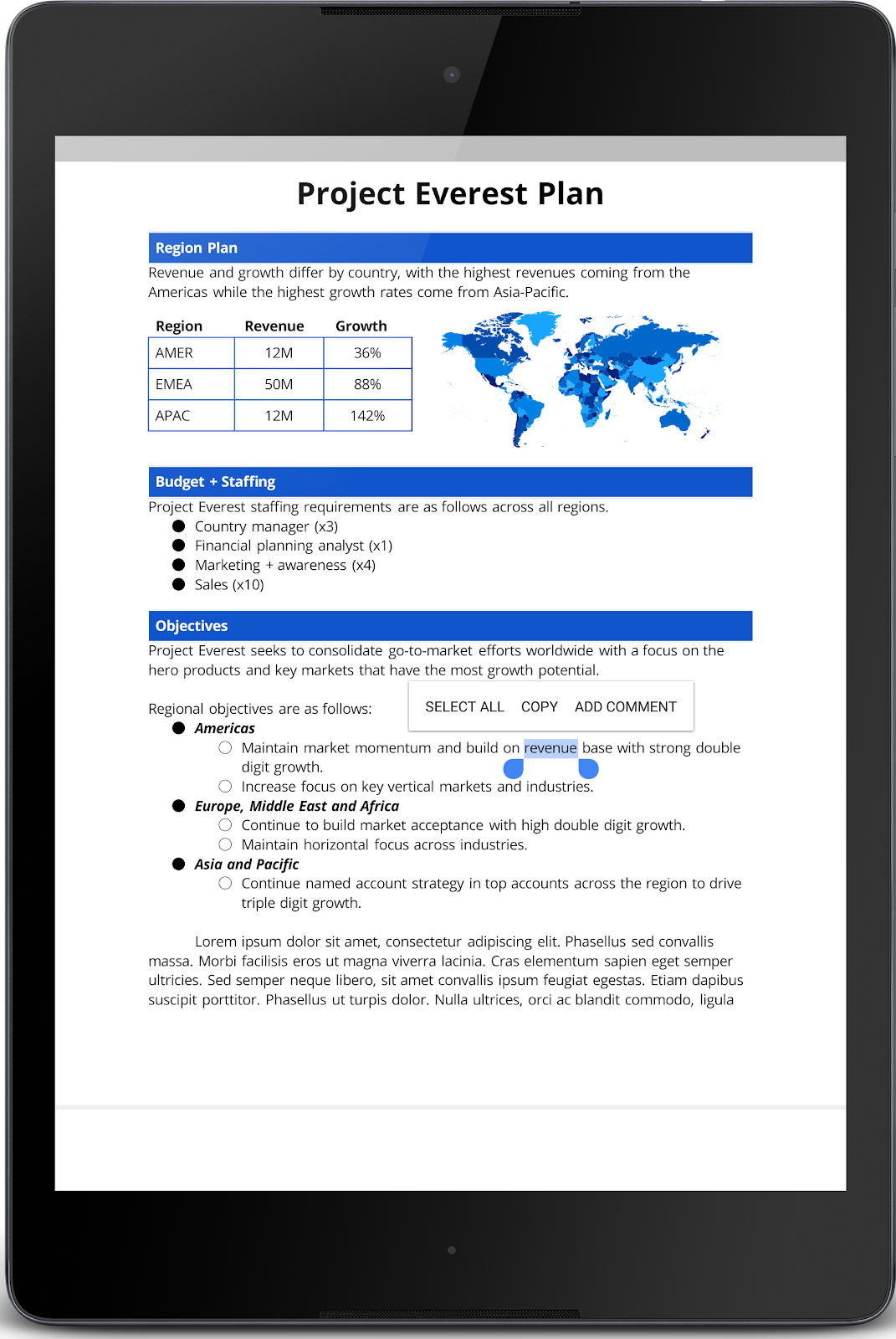
In the Docs Android app, you can now select, copy, and comment on content in Print Layout view.
Launch Details
Release track:
Launching to both Rapid release and Scheduled release
Rollout pace:
Gradual rollout (potentially longer than 3 days for feature visibility)
Thursday, February 25, 2016
Spruce up your spreadsheets and presentations with the latest versions of the Google Sheets and Slides apps for Android
Spruce up your
spreadsheets and presentations with the latest versions of the Google Sheets
and Slides apps for Android
Posted: 25 Feb 2016 01:57 PM
PST
New versions of the
Google Sheets and Slides apps for Android are now available on Google Play,
making it even easier to work from your mobile phones and tablets. Read on for
details.
We recognize that images can be the difference between a spreadsheet that’s difficult to interpret and one that effectively tells a story. To help you better convey your spreadsheet’s message on mobile, images will now render in the Google Sheets Android app. (Note that images in frozen rows and columns may not show properly.)
We recognize that images can be the difference between a spreadsheet that’s difficult to interpret and one that effectively tells a story. To help you better convey your spreadsheet’s message on mobile, images will now render in the Google Sheets Android app. (Note that images in frozen rows and columns may not show properly.)

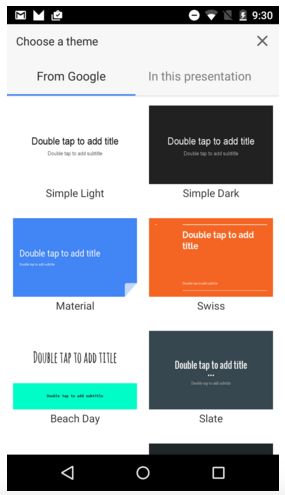
Similarly, themes allow you to quickly and easily craft engaging and effective presentations, so you need to be able to swap them in and out whether you’re working on your phone or your laptop. Starting today, as long as you’re online, you can change the theme of your presentation in the Google Slides Android app. There are 18 themes to choose from.
Launch Details
Release track:
Launching to both Rapid release and Scheduled release
Rollout pace:
Gradual rollout (potentially longer than 3 days for feature visibility)
Monday, September 28, 2015
How Google Classroom Enhanced a Math Lesson
This past week I had the opportunity to participate in a 6th grade math lesson. Both Linda Scanlan & Taylor Sternotti planned and carried out the lesson via Google Classroom. All three of the 'create' functions on the classroom's Stream were utilized. They first 'announced' the lesson by posting an invitation.


During the lesson, they posted an 'assignment' using Google Presentation for the students to plan out and solve the questions of date, place, and host.


Finally, the lesson utilized the 'create question' function by having the students submit their answers to the invite.

Here's what Linda & Taylor said about their lesson:
"Lesson title: Math Mystery BallFirst, we sent an invitation prior to the lesson to all students by sending an 'announcement' through Google Classroom with the invitation attached. Students were intrigued by the invitation. We sent a Google slide presentation with information students needed to complete the activity. The learning objective was for students to be able to reason, abstractly and quantitatively, to solve real world problems using the strategy 'Use Logical Reasoning'. Students needed to solve three logic problems to correctly solve the mystery of when, where and who was hosting the party. Google Classroom provided students with the file on the Chromebook, therefore, they were able to work at their own pace and provided diagrams for visual learners. We sent a question to all students, through Google Classroom, that asked the three details of the Math Mystery Ball. When students solved all three logic problems, they then submitted answers to the question. As a formative assessment, the teachers were able to see students’ responses and comment on each student response in real time. This provided immediate feedback for students to move on to the next activity in the classroom or revise incorrect answers. Students were actively engaged in the lesson and had felt a need to solve the problem correctly. Thanks to Liz Keller for providing the activity."
Friday, January 30, 2015
This Week at Village 1.30.15
It was another great week at Village; I am a lucky teacher to be learning alongside such wonderful and committed educators!
This week…
- the computer lab was abuzz with Google Slide creations. Your students are learning the ins and outs of creating a presentation as well as the tools they will be using for their assessments in March and May!
- 4th Grade Special Education teachers attended a half day workshop to learn how to incorporate Google Apps for Education into their lessons. It was a great session for everyone involved! If you feel that you could lend a hand to these teachers, who are “newer” to the Chromebook experiences and the integration of technology in the classroom, please reach out to your colleagues. We all have so much to teach each other!
- I spent two periods with a wonderful 4th grade class as we logged into and learned the basics of Glogster! I was excited to hear that they are working on their optional assignment-an All About Me. This will allow the students the opportunity to learn about the program they are using without worrying about the content. I look forward to working with them again on Monday!
- I explored plickers with a small group of students in 5th grade. This “exit slip” assessment tool is easy to use and I would love to explore the possibilities with a few more classes. For more information, watch this video and email me for plicker cards! If you want to see plickers in action, it may be coming to your Spanish class soon!
- I am looking for a 4th grade teacher interested in doing a Mystery Hangout with students in Minnesota. Not sure what I’m talking about? Annie Rosenberg and I will be having a morning share in February. Please let Annie and me know if you would be interested.
Be On the Look Out (BOLO) for…
- Google classroom training, which will begin in February. I will be working with one 5th grade teacher and two 4th grade classrooms. If you are interested in learning more about Google Classroom, email me and I will be sure to add you to the list.
- a new Hapara platform, it will be launching in March for 5th grade teachers. I will be meeting with you during flex to review the changes.
- Kaizena. I am looking for teachers (4th or 5th) who may be interested in exploring Kaizena. Kaizena is a Google app/add on that allows you to give different types of feedback on a Google Doc (voice recordings, typed comments and links to more information). If you would like to explore Kaizena with me, let me know.
As always, let me know if you would like to be included in any of these endeavors or if you have any projects you would like me to help you with.
Subscribe to:
Posts (Atom)