Tuesday, April 28, 2015

Animation improvements in Google Slides

Posted: 28 Apr 2015 07:36 AM PDT
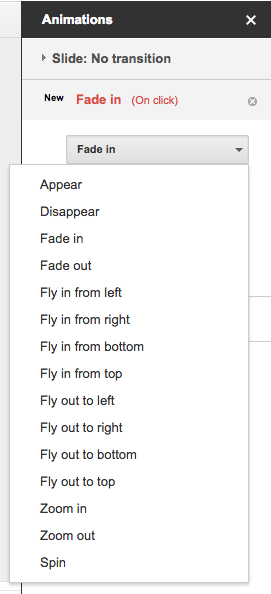
Animations are an easy way to make your presentations look more dynamic in Google Slides. Starting today, you can improve your Slides presentations with two new animations: Appear and Disappear. You can also now set the direction (to and from left, right, top, and bottom) of two previously existing animations: Fly in and Fly out.


Release track:
Rapid release and Scheduled release

Monday, April 27, 2015

A Teacher's Thoughts on Google Classroom: Part 2

Google Classroom From a Special Area Perspective


What a dream it has been to be a part of the Google Classroom Pilot at MRS! This has been what I have been waiting for!  Google Classroom allows me to create a digital classroom space for each of the classes I teach.  As a homeroom teacher, you can create classes by subject.  As a special area teacher (like me), I can create separate Google classrooms for each of the class sections I teach.  


I love the ease of communication with students in Google Classroom.  After each of my lessons, I had been sending a ton of emails to all of the different classes with catch up items for absent students, or instructions for completing assignments, etc. With Google Classroom, I was able to cut down the time communicating these items with students by more than half.  When I want to post an announcement or an assignment, I can post it in one class and then add whatever other classes I would like it to go to.  This means that I can post once but have that assignment or announcement show up on the “classroom wall” of any or all of the other classes I want it to.


Having so many students to grade assignments for, I like that Google Classroom keeps track of who turned in their assignments on time.  If I can’t get to the grading of a few classes until a week after an item was due, I can easily see who completed on time and who did not.  Google Classroom makes it easy to pop a grade in and have it returned to the students so they can see their score.  


I also love Google Classroom for the management of assignments and announcements.  If I need to post an assignment or announcement with other items, I can add a YouTube video, a site link, a Google doc, spreadsheet, form, etc. This means that all the items that a student will need for that assignment or announcement will always be right there on their Google Classroom wall for reference or review. Two thumbs up for Google Classroom! I can’t wait to use it with all of my classes next year!


Written by Danica Taylor

MRS Computer Teacher

Wednesday, April 22, 2015

Teaching teams: New ways to work together in Classroom

Posted: 21 Apr 2015 09:05 AM PDT
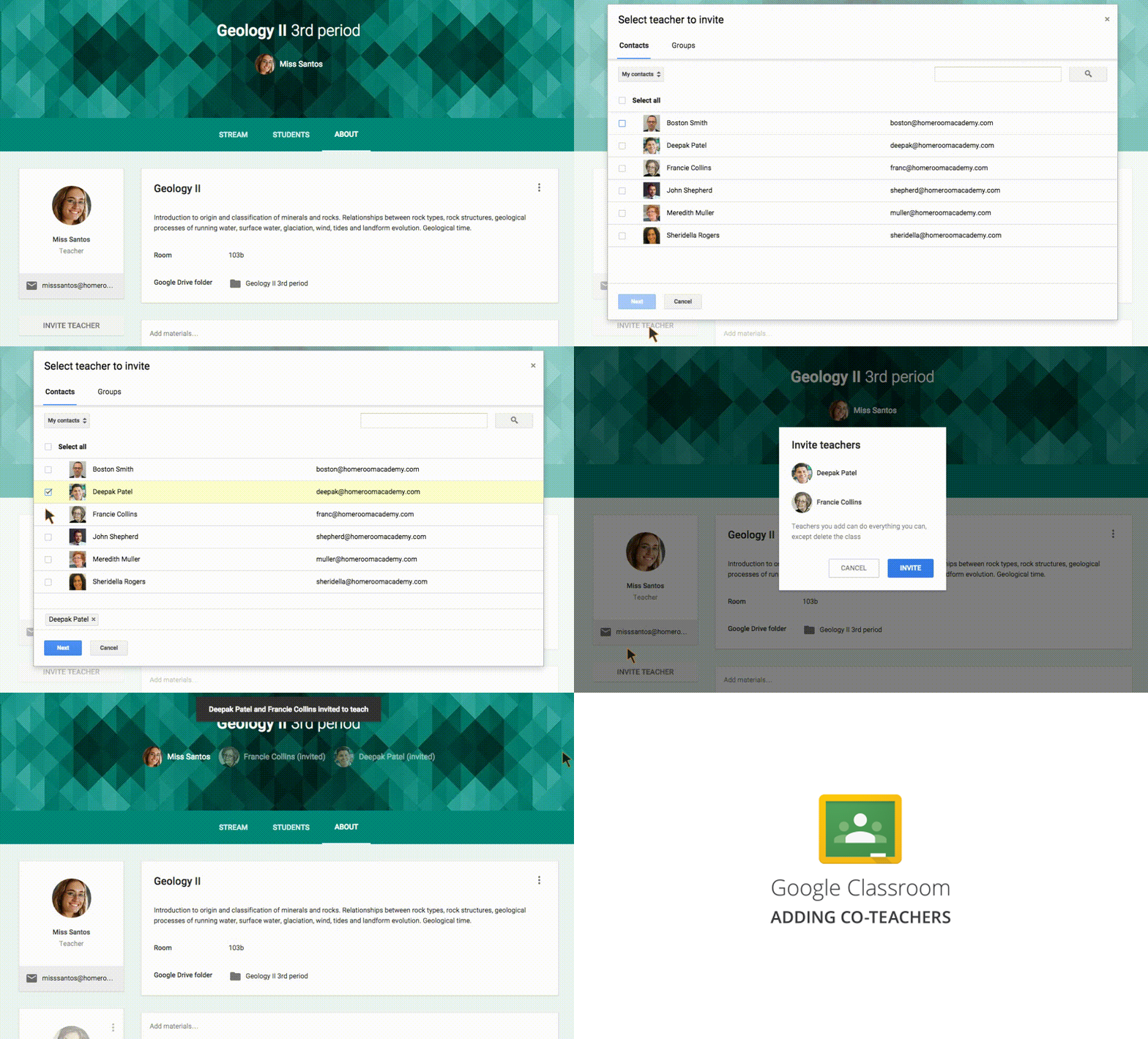
Google Classroom allows teachers to spend less time on paperwork and more time with their students. Starting today, multiple teachers can work and collaborate in a single Classroom class. With the exception of deleting the class altogether, additional teachers can perform all of the same functions as the primary teacher, including:
§ Creating assignments and announcements
§ Viewing and grading submissions
§ Participating in comments on the class’ “stream”
§ Inviting students to the class
§ Receiving email notifications related to the class
Screencast-of-Co-Teacher-2.gif
Teachers can also prep for their classes in advance, saving announcements and assignments as “drafts” and waiting to send them until they’re ready. Like in Gmail, once a new announcement or assignment is created, it will be automatically saved as a draft. Those drafts can then be accessed by multiple teachers, making it simple to collaborate on prep work.

Finally, in response to teacher feedback, we’ve made two additional changes that will make Classroom easier to use:
§ Autosaving grades - Grades will now be autosaved as they’re entered, meaning teachers can grade assignments over multiple sessions but still return those assignments to students all at one time.
§ Improved notifications - Teachers and students will now receive email notifications when private messages are left on assignments.

Release track:  
Rapid release and Scheduled release
Friday, April 17, 2015

A Teacher's Thoughts

Mrs.O and Google Classroom

I love technology. I love it mainly because I can collect information and store it silently.  I am not surrounded by cluttered bookcases full of binders and I don’t need to spend large amounts of money on professional books. So, when I heard about Google Classroom, I decided to give it a try.  What I found was a very user friendly site -- my basic instruction included a very brief (about 10 minutes) introduction and I was good to go.
Google Classroom is AWESOME!  I loved Hapara but I have decided that Classroom/Google works better for me and it is FREE!  First, I just love how it looks when I open the app.  I can customize the backgrounds for each folder and the backgrounds are bright and colorful. The folders - one per subject - include a myriad of choices for teachers. My favorite part is the “assignment” feature. I can assign work that includes a specific due date, set of instructions, comments, and a return button that helps me keep track of finished work. I can also grade the work, make comments,  and then return the results to my students. With a click of a button the grades are instantly transferred to a spreadsheet -- no more writing grades in my gradebook. However, the best part is that I can attach videos, documents, links or attachments to all assignments.  For example, I can send a video to my students, the kids can view the video, and then open a document and write about the video. Because documents created within each assignment are automatically shared with me, I can easily find the completed assignment. There is also a blog option which can be used for interactive comments.  This feature can be turned on or off.  Fifth graders love talking to each other online!!
I also love the “announcement” button.  This feature gives me the option to post any information or tutorials that I want to share with my students and I can do it within the subject folder. No more paper handouts stored in binders, folders, or just jammed into the black hole. All assignments and announcements are easy to find because an icon and explanation appears with each addition.
Finally, the “News and Announcement” page gives me a place to post more links, attachments, videos and documents -- another place to store or share.  I could also turn this page into a classroom blog or interactive board.

So, my suggestion is to give this awesome “Google Great” a try.  Have fun exploring the possibilities.

Written by Barbara Osburn
5th Grade
MRS

Thursday, April 16, 2015

New sharing options, languages and more with the latest version of the Google Drive Android app

Posted: 16 Apr 2015 04:54 AM PDT
A new version of the Google Drive Android app is coming to Google Play over the next week. New features include:
§ After uploading a file, the ability to add people to sharing settings and share a link directly from the upload notification:notification-share.png
§ Ability to access a contact’s extended information from the sharing section of the details pane of a file in Drive
§ Ability to remove a parent of a file from the details pane when a file is multi-parented
§ Support for 23 new languages (Afrikaans, Amharic, Armenian, Basque, Bengali, Chinese (Hong Kong), Estonian, French (Canada), Galician, Georgian, Icelandic, Kannada, Khmer, Lao, Malayalam, Marathi, Mongolian, Nepali, Sinhala, Swahili, Tamil, Telugu, Zulu)
§ PDF viewer improvements (better scrolling and handling of multi-layout PDFs)
§ Performance and UI improvements
We’ve also corrected an issue where Drive was not properly preventing uploads for accounts where Drive had been turned off by Apps admins.

Release track:
Rapid release and Scheduled release (gradual rollout)

New versions of the Google Docs editor apps

Posted: 16 Apr 2015 04:46 AM PDT
New versions of the Google Docs, Sheets, and Slides apps for Android are now available on Google Play and a new version of the Docs app for iOS is available in the App Store. New features include:
§ Docs
§ Accept, reject, or comment on suggestions (Android and iOS)
§ Tracked changes and comments in Word files (Android and iOS)
§ Edit tables (iOS only, already available on Android)
§ Sheets
§ Move, resize, and delete charts
§ Slides
§ Reorder objects to the front or back  
§ Quicker loading and scrolling of PowerPoint presentations from the app
Release track:
Rapid release and Scheduled release
New versions of the Google Docs editor apps

Posted: 16 Apr 2015 04:46 AM PDT
New versions of the Google Docs, Sheets, and Slides apps for Android are now available on Google Play and a new version of the Docs app for iOS is available in the App Store. New features include:
§ Docs
§ Accept, reject, or comment on suggestions (Android and iOS)
§ Tracked changes and comments in Word files (Android and iOS)
§ Edit tables (iOS only, already available on Android)
§ Sheets
§ Move, resize, and delete charts
§ Slides
§ Reorder objects to the front or back  
§ Quicker loading and scrolling of PowerPoint presentations from the app
Release track:
Rapid release and Scheduled release